
The term web scraping may not sound attractive, but last week we got the opportunity to really delve in to it, using a Zomato API to download data off their website. Their API allows you to access detailed information on each of the restaurants which you can massage and, if you’re a foodie like myself, use that information to find the next restaurant to indulge at.
Before using any API, the documentation needs to be referred to as it dictates what you can or can’t do. Scrolling down the page, I knew I wanted to obtain a particular restaurant’s details but the 2 queries I needed were user-key (which is my API key) and res_id.

Without having res_id, I could not proceed. So, scrolling down further, there is a search tool which returns a restaurant’s basic info. This tool produced a restaurant’s basic details and res_id was something that was listed in the model schema.
At this stage, I didn’t know how to form the URL for the download tool but Zomato has a curl I can read which stated “GET –header” which sounded like I needed to select a header. Luckily, the download tool has a tab Headers where I can select my user-key. That’s one step done. Next is the URL. The curl also contained a string “https://developers.zomato.com/api/v2.1/search” which looks like a query I can use for the download tool. With URL’s, you can add queries on by using “&” to filter out things you are interested in.
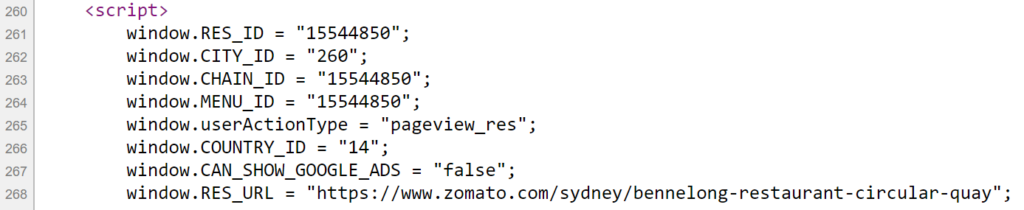
The downloaded data in Alteryx then goes through the JSON Parse tool and filtered for rows containing res_id. To check if everything has been done correctly, I searched up a restaurant on Zomato, viewed the page’s source code and crosschecked it with the res_id obtained on Alteryx.
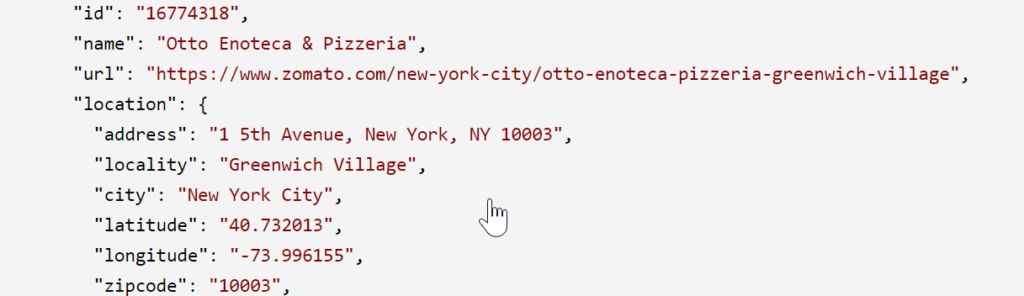
Finally. the same steps (download and JSON parse) were taken again but using res_id as the query in the URL to obtain all the information on each restaurant!!
Now that we have the data we want on each of the restaurants, pick one which tickles your fancy and treat yourself after learning the basics of Web Scraping! Treat yourself!